 luckpanda
Quick answer
Self-employed invoice template: what it is
An invoice is the request for payment you send after supplying goods or services; if you are VAT-registered it must be a VAT invoice with your VAT number, the VAT rate and the VAT charged. UK sole trader invoice, no VAT, no UTR.
Last reviewed:
On this page
Example: a filled self-employed invoice
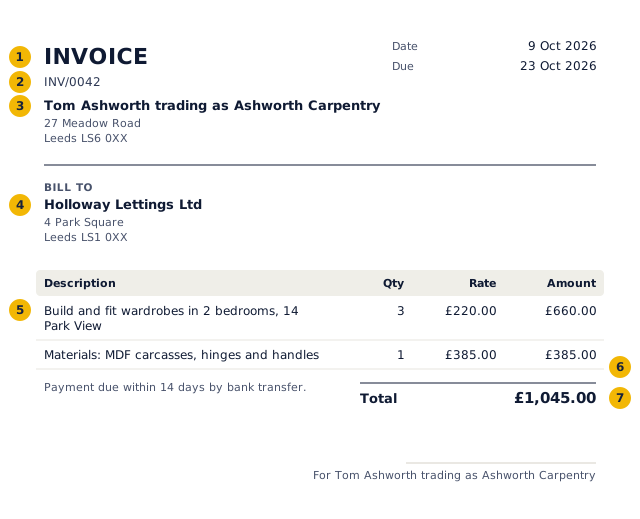
- The title says what the document is: an invoice.
- A unique number from a continuous series, allocated when you issue it.
- Your business name and address, and tax number if registered.
- Who it is for.
- Each line: description, quantity, rate and amount.
- Tax by rate.
- The total in the document's currency and format.
Worked example: the numbers behind the invoice above
| Item | Qty | Rate | Amount | Tax |
|---|---|---|---|---|
| Build and fit wardrobes in 2 bedrooms, 14 Park View | 3 | £220.00 | £660.00 | £0.00 |
| Materials: MDF carcasses, hinges and handles | 1 | £385.00 | £385.00 | £0.00 |
| Subtotal | £1,045.00 | £0.00 | ||
| Total | £1,045.00 | |||
No tax is charged on these lines, so the total equals the value of the supply.
How to fill in the self-employed invoice
- Enter your name, any trading name, and your address.
- Add the customer and a description of the work.
- Leave VAT at zero; you cannot charge it unless registered.
- Set the due date, save, and sign in to issue it.
What a sole trader invoice must show
If you trade under a name other than your own, the business-names rules in the Companies Act 2006 require your own name and an address on invoices as well.
- A unique invoice number, in sequence
- Your name, and your business name if you use one
- An address where documents can be delivered to you
- The customer's name or business name and address
- A clear description of the work
- The date of supply and the invoice date
- The amount due and the total
- Payment terms and how to pay
Records for Self Assessment
Keep a copy of every invoice and record the payment against it. HMRC expects sole traders to keep records for at least five years after the 31 January submission deadline for the tax year. Once Making Tax Digital for Income Tax applies to you, you also need compatible software to keep digital records and send quarterly updates.
What to put on an invoice, field by field
| Field | What to enter |
|---|---|
| Document title | Say exactly what it is: "VAT invoice". The title tells the buyer and the tax authority how to treat it. |
| Number and date | A unique number in a continuous series and the issue date. LuckPanda allocates the number when you issue. |
| Your business | Name, address and VAT number if registered |
| Customer | Name, address and VAT number if registered |
| Lines | Description, quantity, unit and rate. Each line carries its own tax rate. |
| Tax | VAT rate per line (standard, reduced, zero or exempt) and the VAT amount. |
| Totals | Taxable value, tax by component and the total, in the document currency. Amounts in words are customary in India. |
| Terms | Due date, bank or payment details and late-payment terms. |
UK VAT rules for an invoice
- If you are VAT-registered, a full VAT invoice shows a unique sequential number, date, time of supply if different, your name, address and VAT number, the customer's name and address, a description, quantity and price, the VAT rate per item, the total without VAT and the VAT charged in sterling (HMRC VAT Notice 700, section 16).
- Retailers may issue a simplified invoice for supplies of £250 or less including VAT.
- Issue the VAT invoice within 30 days of the tax point.
- Limited companies must show the company name, registration number and registered office address on invoices.
- Not VAT-registered? Do not show VAT or a VAT number.
Mistakes to avoid
- Editing or deleting an issued invoice instead of issuing a credit note.
- Gaps or duplicates in the number series.
- Charging the wrong tax type (for India: IGST on an intra-state sale, or CGST and SGST across states).
- Leaving out the due date and payment details, which is the commonest reason invoices are paid late.
- Rounding each line's tax differently from the total; LuckPanda computes tax per line and keeps the components adding up.
Invoice vs other sales documents
| Document | When | Asks for payment | Tax document | In the books |
|---|---|---|---|---|
| Quotation / estimate | Before the order | No | No | No |
| Proforma invoice | After the order, before supply | Advance only | No | No |
| Invoice / tax invoice | On supply | Yes | Yes | Yes: sale and receivable |
| Receipt | When paid | No, confirms payment | No (receipt voucher for advances in India) | Yes: payment |
| Credit note | After an invoice, to reduce it | No, reduces what is owed | Yes | Yes: reverses part of the sale |
Questions people ask
Do I put my UTR on an invoice?
No. Your Unique Taxpayer Reference is between you and HMRC and is not needed on invoices.
Can I charge VAT if I am not registered?
No. Only VAT-registered businesses can charge VAT. You must register once taxable turnover goes over £90,000 in a rolling 12 months.
Should I write "not VAT registered" on the invoice?
It is not required, but many sole traders add it so customers do not ask why there is no VAT.
What about the Construction Industry Scheme?
If you are a construction subcontractor, the contractor deducts tax under CIS before paying you. Show labour and materials separately, because the deduction applies to labour only.