 luckpanda
Quick answer
Estimate generator: what it is
A quotation is a priced offer made before any work or delivery: the buyer accepts it, usually with a purchase order, and the accepted terms become the contract. Give a client a priced estimate for a job.
Last reviewed:
On this page
Example: a filled quotation
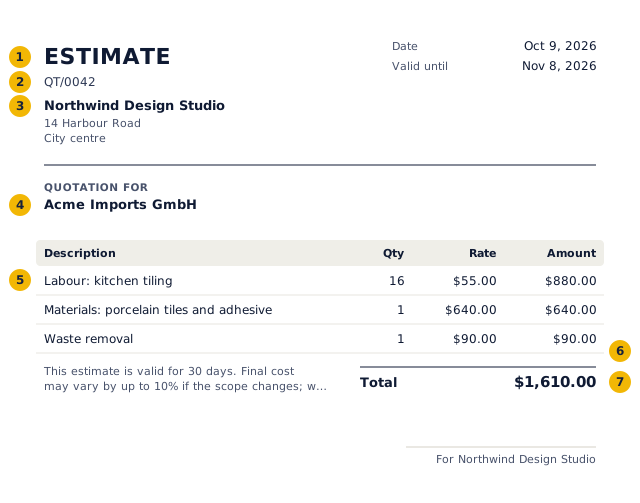
- The title says what the document is: a quotation.
- A reference from your own series.
- Your business name and address, and tax number if registered.
- Who it is for.
- Each line: description, quantity, rate and amount.
- Tax by rate.
- The total in the document's currency and format.
Worked example: the numbers behind the quotation above
| Item | Qty | Rate | Amount | Tax |
|---|---|---|---|---|
| Labour: kitchen tiling | 16 | $55.00 | $880.00 | $0.00 |
| Materials: porcelain tiles and adhesive | 1 | $640.00 | $640.00 | $0.00 |
| Waste removal | 1 | $90.00 | $90.00 | $0.00 |
| Subtotal | $1,610.00 | $0.00 | ||
| Total | $1,610.00 | |||
No tax is charged on these lines, so the total equals the value of the supply.
How to fill in the estimate generator
- List labour and materials as separate lines.
- Say how long the estimate stands and what could change it.
- Save it.
- Sign in to keep it, number it and send it.
What to put on a quotation, field by field
| Field | What to enter |
|---|---|
| Document title | Say exactly what it is: "Quotation". The title tells the buyer and the tax authority how to treat it. |
| Number and date | A reference number of your own series and the date. Quotes and proformas do not use the tax invoice series. |
| Your business | Name, address, and tax ID if your state or client needs it |
| Customer | Name, address, and tax ID if your state or client needs it |
| Lines | Description, quantity, unit and rate. Each line carries its own tax rate. |
| Tax | Sales tax where you must collect it, at the rate for the delivery address. |
| Totals | Taxable value, tax by component and the total, in the document currency. Amounts in words are customary in India. |
| Terms | Validity period, delivery time, payment terms and what is excluded. |
United States rules for a quotation
- A quote accepted in writing is a contract. State the validity period, what is included, and whether sales tax is extra.
Mistakes to avoid
- No validity date, so an old price can be accepted months later.
- Leaving tax out of the total without saying so.
- Vague scope: list what is included and what is not.
- Not converting the accepted quote into the invoice with the same lines.
Quotation vs other sales documents
| Document | When | Asks for payment | Tax document | In the books |
|---|---|---|---|---|
| Quotation / estimate | Before the order | No | No | No |
| Proforma invoice | After the order, before supply | Advance only | No | No |
| Invoice / tax invoice | On supply | Yes | Yes | Yes: sale and receivable |
| Receipt | When paid | No, confirms payment | No (receipt voucher for advances in India) | Yes: payment |
| Credit note | After an invoice, to reduce it | No, reduces what is owed | Yes | Yes: reverses part of the sale |
Questions people ask
Is an estimate binding?
Usually not. An estimate is a best guess; a quote is a fixed offer. Say which you are giving in the terms.
Should I charge for an estimate?
Many trades estimate for free and charge for detailed surveys. Put any fee on its own line.