 luckpanda
Quick answer
Invoice template: what it is
An invoice is the request for payment you send after supplying goods or services. It records what was supplied, at what price and tax, and when payment is due. A ready-to-fill invoice that adds itself up, in any currency.
Last reviewed:
On this page
- Example: a filled invoice template
- How to fill in the invoice template
- Why an online template instead of a Word, Excel or Google Docs file
- What a complete invoice shows
- Payment terms that get invoices paid
- What to put on an invoice, field by field
- United States rules for an invoice
- Mistakes to avoid
- Invoice vs other sales documents
- Questions people ask
Example: a filled invoice template
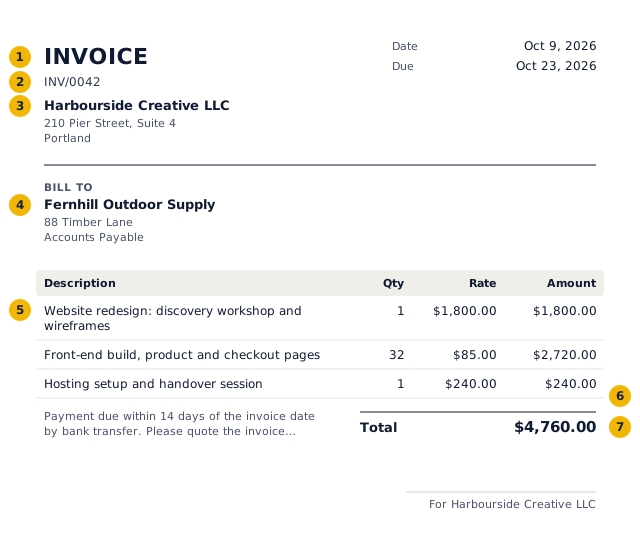
- The title says what the document is: an invoice.
- A unique number from a continuous series, allocated when you issue it.
- Your business name and address, and tax number if registered.
- Who it is for.
- Each line: description, quantity, rate and amount.
- Tax by rate.
- The total in the document's currency and format.
Worked example: the numbers behind the invoice above
| Item | Qty | Rate | Amount | Tax |
|---|---|---|---|---|
| Website redesign: discovery workshop and wireframes | 1 | $1,800.00 | $1,800.00 | $0.00 |
| Front-end build, product and checkout pages | 32 | $85.00 | $2,720.00 | $0.00 |
| Hosting setup and handover session | 1 | $240.00 | $240.00 | $0.00 |
| Subtotal | $4,760.00 | $0.00 | ||
| Total | $4,760.00 | |||
No tax is charged on these lines, so the total equals the value of the supply.
How to fill in the invoice template
- Replace the sample business and client with your own.
- Edit, add or delete lines; tax and totals update as you type.
- Set the due date and payment instructions in the terms.
- Download the PDF free; it carries a small LuckPanda footer. Issuing a numbered invoice, sending it and clean PDFs without our branding need the Sales module.
Why an online template instead of a Word, Excel or Google Docs file
A document template is a page of text. Every invoice made from it is a copy you renumber, re-add and re-save by hand, and a broken formula or a pasted total goes straight to your client.
An online invoice template keeps the same layout but treats each part as data. Quantities multiply, tax is applied line by line, numbers follow on from the last invoice, and each invoice knows whether it has been paid.
| Task | Word, Excel or Docs file | This template |
|---|---|---|
| Totals and tax | Typed by hand or kept in formulas | Calculated per line |
| Invoice numbers | Edited each time | Allocated in sequence when issued |
| Currency format | Whatever you type | Follows the invoice country |
| Payment status | Tracked in a separate list | Recorded against the invoice |
What a complete invoice shows
Countries add their own rules on top: a GSTIN and HSN codes in India, a VAT number and the rate on each line in the UK and EU. The country templates linked below cover those.
- The word "Invoice" and a unique invoice number
- Issue date, and the supply date if it differs
- Your legal or trading name, address and, where registered, tax number
- The client's name and billing address
- Each item with quantity, unit price, tax rate and line total
- Subtotal, tax and amount due, with the currency
- Due date, accepted payment methods and bank details
Payment terms that get invoices paid
Give a due date, not just "Net 30": a date leaves nothing to interpret. Say how to pay and which reference to quote. If you charge for late payment, put the rate in your terms before the work starts; a fee added afterwards rarely holds.
What to put on an invoice, field by field
| Field | What to enter |
|---|---|
| Document title | Say exactly what it is: "Invoice". The title tells the buyer and the tax authority how to treat it. |
| Number and date | A unique number in a continuous series and the issue date. LuckPanda allocates the number when you issue. |
| Your business | Name, address, and tax ID if your state or client needs it |
| Customer | Name, address, and tax ID if your state or client needs it |
| Lines | Description, quantity, unit and rate. Each line carries its own tax rate. |
| Tax | Sales tax where you must collect it, at the rate for the delivery address. |
| Totals | Taxable value, tax by component and the total, in the document currency. Amounts in words are customary in India. |
| Terms | Due date, bank or payment details and late-payment terms. |
United States rules for an invoice
- There is no federal invoice format. Include what your client's accounts payable needs to pay: your legal name, invoice number and date, what was supplied, amounts, due date and payment instructions.
- Sales tax is set by each state. Charge it only where you have nexus (a physical presence or, since 2018, economic nexus by sales volume) and the item is taxable; most services are exempt in many states.
- A business that pays a contractor $2,000 or more in a year (the threshold rose from $600 for payments made from 2026) reports it on Form 1099-NEC, so expect your client to ask for a W-9.
Mistakes to avoid
- Editing or deleting an issued invoice instead of issuing a credit note.
- Gaps or duplicates in the number series.
- Charging the wrong tax type (for India: IGST on an intra-state sale, or CGST and SGST across states).
- Leaving out the due date and payment details, which is the commonest reason invoices are paid late.
- Rounding each line's tax differently from the total; LuckPanda computes tax per line and keeps the components adding up.
Invoice vs other sales documents
| Document | When | Asks for payment | Tax document | In the books |
|---|---|---|---|---|
| Quotation / estimate | Before the order | No | No | No |
| Proforma invoice | After the order, before supply | Advance only | No | No |
| Invoice / tax invoice | On supply | Yes | Yes | Yes: sale and receivable |
| Receipt | When paid | No, confirms payment | No (receipt voucher for advances in India) | Yes: payment |
| Credit note | After an invoice, to reduce it | No, reduces what is owed | Yes | Yes: reverses part of the sale |
Questions people ask
Can I download this invoice template as a Word or Excel file?
No. It is an online template: you fill it in here and it is kept as a document, not a file. That is what lets it number invoices in sequence, calculate tax and track payment. You can download it as a PDF free, with a small LuckPanda footer; the Sales module removes the branding.
Is this like a Google Docs invoice template?
It works in the browser with nothing to install, like Google Docs, but it is built for invoices. Quantities, prices, tax rates and totals are fields rather than typed text, so the arithmetic cannot drift.
Which currency and number format will it use?
It starts in your country's currency. Change the country or currency and amounts, separators and dates switch to that format, whatever your browser is set to.
Is the invoice template free?
Filling it in, editing it and downloading the PDF are free, and the draft is kept for 30 days. The free PDF carries a small LuckPanda footer. Issuing a numbered invoice, sending it, adding a payment link and clean PDFs without our branding need the Sales module.