 luckpanda
Quick answer
Consulting invoice template: what it is
An invoice is the request for payment you send after supplying goods or services. It records what was supplied, at what price and tax, and when payment is due. Retainers, extra days and expenses at cost.
Last reviewed:
On this page
Example: a filled consulting invoice
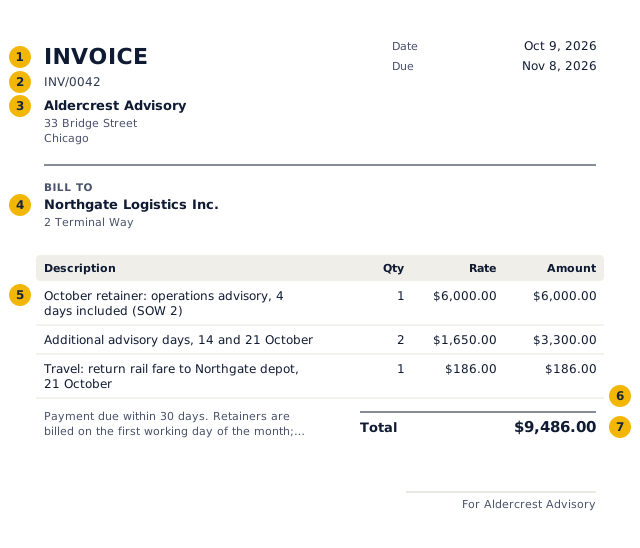
- The title says what the document is: an invoice.
- A unique number from a continuous series, allocated when you issue it.
- Your business name and address, and tax number if registered.
- Who it is for.
- Each line: description, quantity, rate and amount.
- Tax by rate.
- The total in the document's currency and format.
Worked example: the numbers behind the invoice above
| Item | Qty | Rate | Amount | Tax |
|---|---|---|---|---|
| October retainer: operations advisory, 4 days included (SOW 2) | 1 | $6,000.00 | $6,000.00 | $0.00 |
| Additional advisory days, 14 and 21 October | 2 | $1,650.00 | $3,300.00 | $0.00 |
| Travel: return rail fare to Northgate depot, 21 October | 1 | $186.00 | $186.00 | $0.00 |
| Subtotal | $9,486.00 | $0.00 | ||
| Total | $9,486.00 | |||
No tax is charged on these lines, so the total equals the value of the supply.
How to fill in the consulting invoice
- Name the engagement and the statement of work it falls under.
- Bill the month's retainer, then any days beyond it.
- List travel and expenses at cost, with dates.
- Save it; sign in to issue it and see what the client still owes.
Retainer plus extra days, worked through
A consultant on a 6,000 monthly retainer covering four days works six days in October. The invoice shows the retainer, two additional days at the agreed 1,650 day rate and the rail fare for the on-site workshop.
| Line | Quantity | Rate | Amount |
|---|---|---|---|
| October retainer (4 days) | 1 month | 6,000.00 | 6,000.00 |
| Additional days, 14 and 21 October | 2 days | 1,650.00 | 3,300.00 |
| Travel: return rail fare to client site | 1 | 186.00 | 186.00 |
| Total before tax | 9,486.00 |
What consulting clients look for
- The statement of work or purchase order the invoice draws on
- The period covered, and days or hours used against the retainer
- Rates that match the contract exactly
- Expenses with dates and receipts
- Usage to date against any budget cap, in the notes
What to put on an invoice, field by field
| Field | What to enter |
|---|---|
| Document title | Say exactly what it is: "Invoice". The title tells the buyer and the tax authority how to treat it. |
| Number and date | A unique number in a continuous series and the issue date. LuckPanda allocates the number when you issue. |
| Your business | Name, address, and tax ID if your state or client needs it |
| Customer | Name, address, and tax ID if your state or client needs it |
| Lines | Description, quantity, unit and rate. Each line carries its own tax rate. |
| Tax | Sales tax where you must collect it, at the rate for the delivery address. |
| Totals | Taxable value, tax by component and the total, in the document currency. Amounts in words are customary in India. |
| Terms | Due date, bank or payment details and late-payment terms. |
United States rules for an invoice
- There is no federal invoice format. Include what your client's accounts payable needs to pay: your legal name, invoice number and date, what was supplied, amounts, due date and payment instructions.
- Sales tax is set by each state. Charge it only where you have nexus (a physical presence or, since 2018, economic nexus by sales volume) and the item is taxable; most services are exempt in many states.
- A business that pays a contractor $2,000 or more in a year (the threshold rose from $600 for payments made from 2026) reports it on Form 1099-NEC, so expect your client to ask for a W-9.
Mistakes to avoid
- Editing or deleting an issued invoice instead of issuing a credit note.
- Gaps or duplicates in the number series.
- Charging the wrong tax type (for India: IGST on an intra-state sale, or CGST and SGST across states).
- Leaving out the due date and payment details, which is the commonest reason invoices are paid late.
- Rounding each line's tax differently from the total; LuckPanda computes tax per line and keeps the components adding up.
Invoice vs other sales documents
| Document | When | Asks for payment | Tax document | In the books |
|---|---|---|---|---|
| Quotation / estimate | Before the order | No | No | No |
| Proforma invoice | After the order, before supply | Advance only | No | No |
| Invoice / tax invoice | On supply | Yes | Yes | Yes: sale and receivable |
| Receipt | When paid | No, confirms payment | No (receipt voucher for advances in India) | Yes: payment |
| Credit note | After an invoice, to reduce it | No, reduces what is owed | Yes | Yes: reverses part of the sale |
Questions people ask
Should consultants bill in advance or in arrears?
Retainers are usually billed at the start of the month they cover. Time and expenses are billed after the work, at month end or on a milestone.
How much detail should time lines have?
Enough for the client to match them to the work: dates and the workstream. Attach the full time log rather than listing every entry on the invoice.
Can I mark up expenses?
Only if your agreement says so. Most consulting contracts reimburse expenses at cost, against receipts and within a travel policy.